Showing posts with label Technology. Show all posts

July 7, 2009

Twitter Tuesday: DNR Daily Twitter Summary

0 comments
Where have the daily Twitter summaries gone? This is a question that some people have been asking me. That is a great question and I'm glad you asked.

The service that I was using to do the Twitter summaries has crashed. It was a service called LoudTwitter. The service doesn't look like it will be back up anytime soon either. Here is the latest post from http://loudtwitter.com and I quote:

DNR* for loudtwitter

Let's do a quick tour of the situation:

I enjoyed a lot working on loudtwitter and the challenges it represents. I had fun times but also horrible time dealing with bugs (my bad), support (some nice people out there, and also some jerks) and technical issues.

Financially, loudtwitter operates at loss. Some nice people donated money (up to $50 for one donation!), some didn't (and that's ok, too). The donations totaled $336 over two years, but the operation expense (not counting my time ;) is $575 a year (hosting + domain name).

If I get back my Hard Disk (odds aren't looking good), then I'll probably renew LT domain and continue monitoring it and making sure it works. If I don't... restarting will be too much work for me, it would mean:

- Reinstall the operating system
- Reinstall the code and all software moving parts (Perlbal, Gearman etc...)
- Since I won't have the exact software version I was running, I will spend a lot of times to make it run the way it was previously running (I'm thinking about OpenId here and some other software: Catalyst)
- Reconfigure mysql in active-active replication on the same box (tricky)
- Reconfigure the backup system
- Restore the backups (I don't know how old, yet)
- Making sure it runs correctly

So, we'll see, but I hope you understand my current thinking.

*DNR: Do Not Resuscitate


So I am on the lookout for a new way to give the readers of my blog a way to keep up with my Twitter feed without joining Twitter. If you know of a service or use a service that you like please leave a comment.

Also I will probably be going to a weekly update of my Twitter summary instead of a daily in the future. Of course if you want to join in on the conversation you can follow me on Twitter or even subscribe to the RSS feed of my Twitter account by going to http://twitter.com/mattmckee

June 11, 2009

Tech Thursday: Wii Whiteboard meets Cooliris

0 comments
Today we played around with the concept of the Wii Whiteboard. Johnny Chung Lee who is a genius was the first person that I heard of that was doing the Wii Whiteboard. The idea is to have an interactive Whiteboard that can be projected on any wall or surface. Here is his video explanation.


I told you that the guy was a genius and this application of 2 Wii remotes is incredible.

Chris Welsh decided that he wanted to experiment with this for an upcoming series that we have at our church. Chad Hovind our Senior Pastor wanted to be able to simulate something that would look like it came out of the Minority Report. After playing around with the Wii Whiteboard we got bored after about 15 minutes. It looked just like you were on a computer and that seemed kind of lame. We wanted cool. We then loaded Cooliris on the computer. Here is what it looked like when we loaded in a PowerPoint presentation from one of our recent services. All of the slides are .jpg's. Not only that but you also get to hear some of the brainstorming that is going on. Enjoy.


By the way, we already had the Wii remotes, a projector, and a computer. Chris had to make the pen which ended up costing less than $5.

I can't wait to use this for my presentations. Why do a boring slide by slide PowerPoint? Instead you can have an interactive leading presentation that gives the speaker more options and the audience more visuals. Now if I could figure out a way to play sound effects and background music at the same time with the pen in Cooliris then I would have an incredible piece of software for large group presentations.

May 14, 2009

Tech Thursday: Twitter Failed Me!

8 comments


I hate to admit this but Twitter failed me. That's correct. The almighty social network that I use on a daily basis has let me down. I not talking about it being down either. Check this:

This past Tuesday I started an experiment on Twitter. I needed and still do need an oil change for my car. I sent a message out on Twitter that the first oil change company that responded with a coupon got my business. Simple enough I thought. I was expecting at least 2 companies to reply. I was even hoping that it would be free because they get the publicity and advertising on Twitter. Now I do understand that the oil change industry is not known for their use of Web 2.0 tools and they do prefer the wrench over Facebook. That day I sent out 3 messages about needing an oil change. I did not get one response. Nothing. Nada. I couldn't believe it. The hottest thing going right now couldn't help me get an oil change for my car. It really did shock me.

I tried again on Wednesday. This time I did not require a coupon. I just wanted to get some type of response. Again I got nothing. Nada.

I had people asking me how it went. I had direct messages asking who responded. I even had a Marketing Firm comment on the lack of interest.

Could it be that I'm not being followed by enough people? I don't think so. I have around 850 people who receive my tweets. Could it be that I don't tweet enough? I hope not. I average about 14 tweets a day. Could it be that I tweet to much? This type of customer service shouldn't have anything to do with how often I tweet. In fact none of those questions are really valid for this type of customer service. A simple search on Twitter will let you know of everyone who needs an oil change. In fact here is the search "I need an oil change" at the time of this post.

Why then did I not get a response? Believe it or not but I'm not really sure. Lack of knowledge maybe. Not knowing how to use a tool, probably. Opportunity, you better believe it.

What industry do you think would have responded the quickest or even at all?

Do you think your business, church, or organization would have responded?

I have another experiment that I am going to try on Twitter soon. I will let you know how it goes.

April 23, 2009

Tech Thursday: Orange Conference Tech Tools

3 comments
Did I tell you that I am going to be at the Orange Conference in Atlanta, GA next week? Of course I did. Do you want to keep up with the conference even if you aren't in HOTlanta? Well, I've got great news for you. You can and not only by me but by a host of people.

First let me tell you the approach that I'm going to take to cover this conference. Let's break it down into 3 categories. The hardware, the software/ways to follow along, and the giveaway.

The Hardware
1. iPhone
2. HP Tablet (sorry iMac you have to stay home)

Yes that is all the hardware I will need. I like to make it easy on the travel bag. I think you will be amazed though by all of the things that you can do with just these 2 pieces of hardware. Moving on...


The Software/ways to follow along
1. Scribble Live will be here at mckeelive.com (and yes this is a blogger site and not wordpress, I know already)
2. Twitter will be lively at twitter.com/mattmckee with pictures, quotes, and fun stuff
3. Qik will be streaming live video to qik.com/mattmckee, mogulus.com/mattmckee, and facebook. You can actually interact with the live video that is being shot from my iPhone at qik.com/mattmckee.


The Giveaway
I have to opportunity along with some others to give away a sign autograph copy of Reggie Joiner's book "Think Orange". The book is signed by him and not me unless you really want my signature but I don't think you will. The book will not be released until June so don't try and go buy it right now. Anyways, here is how I'm going to give the book away. I have a feeling that there is going to be 1000 guys at Orange that look like this guy:


So here is the contest... The person who looks like and sounds most like Danny Gokey at the conference is going to win the book. I will be taking pictures of the finalist and maybe have a poll to see who you think should win the prize.

April 9, 2009

Tech Thursday: Tweetdeck vs Seesmic Desktop

1 comments
I found it very odd yesterday when I went to download Seesmic Desktop to try it out that a new version of TweetDeck popped up on my screen for me to download. As if Tweetdeck knew I was on the Seesmic site getting ready to check out their competitor. Hummm... Coincidence or perfect timing by Tweetdeck? I will let you be the judge.

So which desktop Twitter client is better? I could write everything that Mashable.com wrote yesterday or I could copy and paste what they wrote and give them credit. Let's just give them credit. Here is the post: (Thank you Mashable for doing a great job. If you don't read this site on a regular basis then you should. It really does rock.)

At the rate that TweetDeck (TweetDeck reviews) and Twhirl (Twhirl reviews) (which as you might know just morphed into Seesmic Desktop yesterday) are iterating, it’s hard to keep up with which client should be crowned the king of the desktop for Twitter (Twitter reviews).

In round one of our head-to-head, Twhirl emerged the victor, but Twhirl is no longer Twhirl, and TweetDeck has since blossomed into a full-featured, multi-purpose application with much improved performance. To the victor go the spoils, but who’s at the head of the class right now? Let’s take a closer look and find out.


User Interface Updates


Now that Seesmic Desktop supports multiple columns, we fear they may be in danger of over complicating the once super simple, yet powerful, UI. Where Seesmic’s client trips over itself a bit is with the all-powerful home column, which appears to be designed to replicate the experience of Twhirl.

Almost every Twitter-related activity occurs within the home column, until you detach a view into a separate column. Thankfully you can detach as many columns as need be (with TweetDeck you’re limited to 10), delete them just as easily, and drag-and-drop them to rearrange their order.

seesmic-desktop-ui

Seesmic Desktop’s left-hand side bar is a big improvement from Twhirl’s bottom navigation options, and enables you to quickly toggle between views of the Home column to see replies, private messages, sent messages (TweetDeck still doesn’t have a simple way to view your own tweets), accounts, userlists, and saved searches. We’re not sure why, but userlists and searches with their own column can’t be viewed in the Home column. It’s an oddity that will likely get fixed with time.

Another UI improvement is the search bar in the bottom left-hand corner. Type whatever you want to quickly search Twitter. Results are displayed in a new column. Since the query appears in the left-hand navigation bar, you can easily return to the column and your search, even when you go overboard on the number of columns you create.

tweetdeck-ui

On the flip side, TweetDeck’s UI remains unchanged. You can still have a single column for a very singular experience, or expand to multiple columns. Columns are consistent in size, shape, and function, but not as easy to find when you near column capacity — think lots of scrolling left and right.

tweetdeck-column-buttons

For Twitter-only columns, from left to right, users can move a column left, filter tweets in a column, mark all tweets as seen, clear viewed tweets, clear all tweets in a column, or move the column right.

tweetdeck-top-buttons

TweetDeck users can also look to the top right hand corner to open the tweet box, or add a column for all friends, replies, direct messages, favorites, a new group, search, Twitscoop, 12seconds, StockTwits, and Facebook (Facebook reviews).

Both TweetDeck and Seesmic Desktop use Twitter avatars to house four icons you can interact with to either send a reply or DM, retweet, or perform more actions. So it’s essentially the same experience for that function, though TweetDeck does provide a few more bells and whistles if you click “other actions.”

Believe it or not, the bottom line is that TweetDeck’s UI is currently the simpler of the two.


Feature Frenzy


seesmic-desktop-accounts

If you need to manage multiple Twitter accounts, then you can stop the comparison the now. TweetDeck can’t help you in that department. Seesmic Desktop has no built in limitations when it comes to the number of accounts you can add, nor does it duplicate tweets common to multiple accounts.

tweetdeck-more-actions

However if tweet-related features are tantamount, then TweetDeck should be your final destination. Sure you can follow new tweeps via Seesmic Desktop, but it’s not obvious (look for the “+”), and there’s no confirmation of the follow at the moment. With TweetDeck, you can do a boat load of tweet and user-specific actions. Clicking the gears icon gives you follow, unfollow, profile, search, and group options, plus the ability to favorite tweets, email a tweet, translate, mark as read, or delete.

Oh and if you want Facebook, TwitStock, 12seconds, and TwitScoop integrated into your desktop experience, then stay with TweetDeck. Seesmic Desktop is Twitter-only, but only for the immediate future.

Both TweetDeck and Seesmic Desktop support Digg URLs and custom groups, so neither of those features should be deal breakers for you on either app. Seesmic Desktop’s groups are called userlists and are available via the left-hand side bar for quick reference. TweetDeck’s groups, however, will appeal to you more if you need to bulk add members to them.

seesmic-web-cam-photo

In the photo department, you’ll likely ooh and ahh at what you can do with Seesmic Desktop. Want to drag-and-drop a photo instead of upload one? No problem. Would you rather just take a snap shot using your webcam? You can do that too. TweetDeck just does TwitPic (TwitPic reviews).

We’re really torn when it comes to features, but pretty confident that they’re dissimilar enough to help you make a choice that suits your needs best.


TweetDeck Is The Winner, But For How Long?


Personal preferences aside (I need multiple accounts and unlimited columns so I’ve switched to Seesmic Desktop semi-permanently), we have a feeling that just more than half of you (we’ve been watching tweets and comments) will be more satisfied with TweetDeck over Seesmic Desktop for the time being.

Meanwhile, both competitors will continue to innovate and imitate at the top of the desktop client food chain. Our suspicions, based on what we know about the product plans, are that eventually Seesmic Desktop may have the upper hand on its chief competitor as it refines the user experience and builds in promised features like Facebook and Seesmic (Seesmic reviews) integration, support for multiple photo sites, additional URL shorteners, and quicker ways to add people to userlists.

(End of Article)

Here is the major thing I want though from one or the other. I want to be able to sync across multiple computers. I would love to set up my Tweetdeck once and it be the same on every computer I use or that could be said of Seesmic Desktop as well.

I know that Peoplebrowsr.com will do the sync deal because it is online but the interface is not close to either Tweetdeck or Seesmic Desktop. Peoplebrowsr at this point is clunky and ugly.

So please I am asking for a Twitter client that has all of the best funcitons and then some. Those include:

1. Multiple Accounts

2. Saved searches

3. Syncing across platforms and computers

4. Facebook intergration with reply to Facebook Status in Twitter Client

5. Picture management more than just Twitpic

6. 12seconds video

7. Set up and publish Twitter experiences for others/clients with search terms and followings

8. More than 10 columns

9. Better performance and less memory usage

10. Preview of shortlinks and pictures


There you have it. This is my wishlist. What would yours be?


March 26, 2009

Tech Thursday: The Better Question

0 comments
Is Twitter asking the wrong question or is Facebook asking the wrong question? I find it interesting the difference.

Twitter asks, "What are you doing?" If I am going to answer that question I wouldn't put an interesting article, a good quote, or really any useful information for anything other than what's interesting about me.

Facebook asks, "What's on your mind?" When answering this question I have more ways to give out interesting information about others but probably not going to answer it with interesting things about me.

Which question is better? One tends to lean one way and the other seems to go the opposite. Is there a better question?

The best one I have come up with is "What do you find interesting?" but even that doesn't do it for me. Suggestions?

February 26, 2009

Tech Thursday: iPhone App Creation

2 comments
I have set a new goal for myself that I would love to see happen before I turn 31 this year. I want to create an iPhone App or at least be on a team that does. I have 2 very viable Apps that are not currently in the App Store. One would be a free download with possible large company backing and the other is a $1 or $2 deal that is aimed at a niche market but still sustainable.

Why do I want to do this?

1. The trend is for everything to go to the mobile phone.
2. I'm tired of ideas and nothing happening with them.
3. I would love to have these 2 things on my iPhone and no one is doing it yet.

How can you help?

1. If you already have created an App for the iPhone I would love to know the process.
Please teach me.
2. If you want to help create these 2 Apps then please get in touch with me.
3. I think I can get funding for both even in this economy but if you want to fund it be
my guest.


Now if you want to be on the team and get this done then let's do it. I can find very few reasons why this can't happen. I could come up with excuses but nobody cares about that.

February 19, 2009

Tech Thursday: Jott 2.0 for iPhone

0 comments
I first wrote about Jott on April 11th, 2007. A lot has changed about their service since that day. The service has gone from free to a monthly subscription service. It has added tons and tons of features over this time as well. I use the $3.95 a month service and it does everything that I need and much more. It is better than any other voice to text service that I have come across, hands down.

Today I received an e-mail from them telling me about an upgrade to the service for the iPhone. It was much needed and Jott has done very well in their execution. It is simple, effective, and a game changer. If you have an iPhone you will be well served with their new App. The return on investment will be made on the first day that you use it.

Here is the video from Jott that explains all that it can do. Enjoy.


February 16, 2009

Ministry Monday: Parental Controls, iPod Touch, and Preteens

5 comments

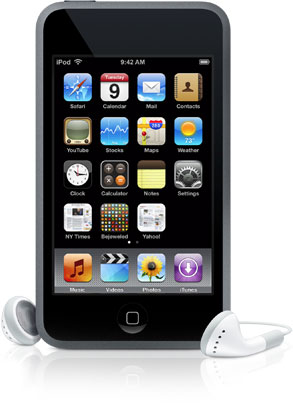
Over the last month I have had more parents ask me how to control the iPod Touch that they bought for their preteen. The fear of course is that the preteen will be able to access music, websites, and video that is not appropriate for them or really anyone else for that matter.

So your preteen wants an iPod Touch, how do you protect them?

1. There are parental controls on the device. Simply go to the settings of the iPod Touch and click on the General Settings. From there you go to Restrictions and decide what you want to turn off or turn on. While this is helpful it doesn't solve all of the problems of course. A techy preteen can hook the device up to iTunes again and set everything back to default which would wipe these settings out. So you go to step 2.

2. There are parental controls in iTunes. Simply go to Edit and click on Preferences. Pick the Parental Controls tab and set your restrictions there. Here is one of the simplest ways to keep your kid safe. Set up the iTunes account in your name with your user name and your password. Don't give your password to your child for any reason. This way if your child wants to put Apps, music, and videos on the iPod Touch then they have to come to you. Could this be a hassle? Only if you don't want to know what your kid is looking at, listening to, and watching. It also lets you into your kids world and makes you talk to your child. That is a wonderful thing and not a bad thing.

3. Safe Eyes Mobile- finally you have set all of your restrictions, parental controls, and you think that you want your child to be able to go to sites like Disney.com or other family friendly sites but you don't want them to use Safari. If this is you then you are a very smart parent in my book. There is another web browser in the App store for the iPod Touch that restricts all adult content and is very good. It is called Safe Eyes Mobile and was created for you and this instance. It is well worth the $20 and can be found easily in the App store by searching for Safe Eyes. Why buy a device that does all kinds of cool things and not use it? This gives your child a little freedom and lets you rest a little easier.

4. Talk to your child and check the device- I know that I already said this above but it is well worth a mention again. The best thing that you can do as a parent is talking to your kid. Let them know your expectations, thoughts, and wisdom. Let them know that you love them. Let them know why boundaries are put into place.

I am all for giving kids technology, but someone has to be the adult and we can't count on the kid to do that. The iPod Touch is a great, and I mean a great device. If you can get one for your child I would reccommend it but please make sure and keep them safe.

February 3, 2009

Twitter Tuesday: New Tag #kidmin

0 comments
Are you using twitter? Do you know about hashtags? Tags are a great way to look at a topic. For instance if you wanted to see everyone's opinion about Super Bowl commercials you could go to http://search.twitter.com and put into the search bar #superad09. It would pull up tons and tons of people's opinions about the Super Bowl ads. Why does it pull all of these up? Because at the end of each of these post the person tagged it with the tag #superad09. Fairly simple but also very important. It makes twitter just that much more useful. There are to many tags to list below but there is one tag that I think you should know about if you do Children's Ministry. If you could mark your tweets that have to do with Children's Ministry with the tag #kidmin then that would really help us out. It would let us know who you are and then it would also let us know what you are doing in ministry or what questions you have. I look forward to seeing what the tag #kidmin does for the Children's Ministry community.

January 8, 2009

Tech Thursday: I should be excited.

1 comments
Being a tech geek of sorts, I should be outside my mind excited about this week. I should be on Mashable, Engadget, TechCrunch, Technorati, and all other sites that are geeking right now. The thing about it though is that right now I am very underwhelmed. Underwhelmed by MacWorld. Underwhelmed by CES in Las Vegas.

I know I said this before but innovation is the only thing that will get us out of any economic down turn. Innovation is the key to future power, growth, and stability. Why am I not excited about the biggest week in technology right now? Simply put there is a huge lack of innovation.

It doesn't matter if Steve Jobs or Bill Gates is giving the keynote. Steve Ballmer and Phil Schiller could have been better if the message was better. It is about the message not the messenger. Jobs and Gates are who they are because of their messages of innovation.

Please tech world get back to creating and not revamping.

January 5, 2009

Interaction is ALIVE

0 comments
Wired Magazine wrote last year that blogging is dead. The article goes on to say that services like Twitter, Flickr, and Facebook have replaced this once hot service. So what is the point? Interaction on blogs have slowed way down and is moving to other areas. Why? Because it is easier to interact in Twitter. It's easier to keep up with your friends in Facebook. People want to interact with each other. They want to be able to ask questions and get answers. They want to be able to share their life with others and in return learn, grow, and just maybe earn a little respect. Can blogging come back to life? Of course it can. But only if interaction comes back to blogging.

Here is my plan for interaction for 2009.

Twitter- you can follow me, ask questions, see what I'm doing, and read what I think is interesting all by becoming my friend or following me at http://www.twitter.com/mattmckee. I reply and the most interaction through this service. It is by far the easiest way for my to interact.

Facebook- you can become my friend and get all of my Tweets from Twitter by reading my status on Facebook. You see, I update Twitter and it updates Facebook. So you get all of the benefits of what I am doing but I don't interact as much. I will do better in 2009 with the interaction through Facebook but it is harder. Why? It is an extra step for me to log-in and find your response so that I can then interact. Therefore interaction is not as quick.

McKeelive.com- I will continue this site. I enjoy it. It is a nice form of experession and tidbits of information. Thank you to all of my readers. Here is my promise for 2009 because I don't want this site to be dead. If you comment on one of my post. I promise to at least acknoledge by saying thank you. I hope that we can have healthy conversations even when we may disagree.

Qik.com- I love this little service. Being able to do live video from my cell phone is just stinking cool. If you follow me on twitter or facebook then you will get a notice that I am about to go live and you can actually interact with me while I am shooting video from my phone. You can comment on what is being videoed by going to http://www.qik.com/mattmckee while it is live. If you just want to check out the videos after the fact, then come here and check out the qik feed on the right hand side of this site. I am really excited about this in 2009.

Tokbox.com- This is a a video conferencing site that I am stoked about for 2009 as well. This is where you can video call through your computer for free or get in a "room" with a lot of people and discuss topics. This is the best service for this so far and it is Flash based so it works with Macs and PCs without anything to download. You can become my friend by going to http://www.tokbox.com/mattmckee

And Finally----

E-mail- If you really want to get a hold of me for some reason and you don't care when I get back to you, then send an old school e-mail. My e-mail address is matt@mckeelive.com.


I look forward to the interaction this year. I can't wait to find new ways to learn and be apart of people's lives.

November 20, 2008

Tech Thursday: The Future is Voice

2 comments
I think the future of technology is all going to Mobile Devices. I can't say phones because they are so much more than that. These Mobile Devices will eventually be your all in all communications, credit cards, and gaming centers . It may look like a mini-laptop, netbook, or even iPhone but you will be able to receive phone calls, multitask documents, play games with people all over the world, and even hold your own press conferences on it. It will be harder and harder to get just a phone or just a laptop or just a whatever. It will be a device that is all incompassing.

How will these devices run? I think Google gave us a hint this week. You can read their post about voice activated search here that is available for the iPhone. I truly believe that all programs will have to go this way. Voice recognition software is getting better and better. It is not quite there yet but it will be. And when it is then you won't need a keyboard for very much. You will be able to speak to any program and get it to do what you want. Think about the possibilities. Let's say you are in a design program like Photoshop. You speak to the program and tell it to draw a red circle over a blue square over a green triangle and then ask it to give a gradient to all three and mesh them together at a 45 degree angle. You can say that a lot faster then you can do it. You can say a lot of things faster than you can do it. You mouth and brain work more effeciently than your brain and your hands.

The revolution of touch screens and multi-touch screens are already here. This will eventually get rid of the mouse. I can't wait for the keyboard to go away with the revolution of voice as well. I think we will see this revolution very very soon. Are you ready?

October 30, 2008

Tech Thursday: Google Earth on iPhone

0 comments
As I type this I can't say that I feel the best in the world. I have been on the couch for the past 2 days. Besides watching to much ESPN SportsCenter I have downloaded all kinds of new Apps for my iPhone to get my mind off of things.

Which App has been my favorite? Well I would have to say that the most impressive one is the Google Earth App. I love that I can explore the Earth without ever leaving my living room. I can see mountains as if they were right in front of me. I can go back and look at countries that I have been to and remember incredible things that happen there. I can even find new places that I really want to go to and check them out. The functionality of Google Earth on the iPhone is incredible. Google has done a very impressive job using all of the functions of the device. For some reason I find this very fascinating.

Here is a good video put out by Google explaining the App. It is just another reason to go out and buy an iPhone.


October 16, 2008

Tech Thursday: Dinosaur Obsession

3 comments
So what is up with the new Dinosaur obsession and kid's toys? Have you noticed all of the different dinosaurs that have come out over the last year or so for kids? Seriously.

Now don't get me wrong, I think some of these are really cool. I am even impressed with the technology that is packed in to the dinosaurs. I know that if I was a kid I would want more than one of these on the following list.

1. Pleo by Ugobe. Pleo is not simply a robot and probably started this whole obsession that started. Here is a nice pic and video of it in action:


Pleo cost $350. It is very interactive and not remote controlled. This guy is pretty amazing.

2. Kota My Triceratops Dinosaur by Playskool. Kato is a ride on dino that doesn't walk but will wag his tale, open his mouth, and move his head. Here is a good pic and the commercial for this toy that is for ages 3+.


I can see both of my boys loving this toy. I don't see it fitting in my house or me buying it because it cost $299 but it adds to the dino obsession that will happen this Christmas.

3. D-Rex interactive Dinosaur by Mattel. D-Rex is a Pleo wannabe and is your typical attempt to copy an original. It officially comes out on October 20th, 2008 and I suspect it will do very well this Christmas. It may even be the hottest toy this Christmas. Here is a pic and a video as well:


D-Rex is going to cost $149 which is a lot cheaper than Pleo but doesn't look as sophisticated. We will have to wait and see, though.

4. Spike the Ultra Dinosaur by Imaginext. Spike is different than the rest because he is a wireless remote control dinosaur. There is not the sort of pet feature to Spike but both of my boys love the display at local toy stores. Here is a pic and the commercial for him as well:


Spike started out at $149 but you can now find him for $129. I expect he will drop in price again before Christmas because D-Rex but we will see.

There you have just some of the biggest in the Dinosaur Obsession that will be this Christmas. I have a feeling that my family will be getting at least one dinosaur but I still don't know if it will be any of these. It might be the $25 remote control one we saw yesterday that isn't as cool as any of these, but if I had my choice it would be Pleo. With the ability to upgrade its software through an SD slot and its over all sophistication it wins in my book. I just wish it wasn't $350.

October 9, 2008

Tech Thursday: I'm bored

1 comments


I haven't written about technology in over 2 months. Even then the post was about how to enter into the Technology conversation using all of the tech toys and apps that are out but that wasn't that exciting. Here is the problem. There has been nothing since then that has really peaked my interest. Nothing has gotten me stirred up to the point of excitement. As the picture above states, I have been looking for true innovation.

What has happened over the last 2 months:

1. The G1 or Google Phone was announced by T-Mobile, but I really don't think it is going to take over the iPhone anytime soon. Boring!

2. Electric cars were announced by Chrysler. This isn't new, the capabilities have been there for over 25 years.

3. I had to pay for Jott.com to use it like I normally do. Willing because I love it but come on.

4. Our church started using Planning Center Online. Good but boring.

5. I now have downloaded over 50 apps on my iPhone. None have changed my life. Many are fun and amusing but not that exciting. Boring!

I really think those are the highlights for me over the last 2 months. Look, I know that the economy is in a wasteland and the markets all over the world are looking like lead balloons but if we don't start innovating then nothing is going to change. Innovation is the key. So please tech world, do something absolutely amazing for all of us. We could use it right about now.

August 7, 2008

Tech Thursday: The Conversation Prism

0 comments
Are you having trouble keeping up with the Tech World and all of the services out there? I know that I read about technology and use technology like crazy and I feel like I am behind most of the time. In my efforts to keep up I came across this excellent graph called the The Conversation Prism. Check it out:


Now of course this is not all of the services but I think you will find many that you didn't know about. There are many that are being created today and some that just didn't make the list but overall this is an incredible start.

Why is this important?

1. You have to know where the conversation is going on to be able to join in.
2. You have to be willing to share on multiple platforms to get the full picture (at least today you do.)
3. You have to be able to digest information quickly to stay up to date.

I hope this at least gives you an idea of where to look today for something new. The more people we have in the conversation the better we will all be in the end. I just can't wait for someone to condense the platform so that the conversation can be changed more efficiently and effectively.

(Hat Tip to Robert Scoble's FriendFeed and to Brian Solis and Jess3)

July 24, 2008

Tech Thursday: The Love Hate Relationship

1 comments
This cartoon was on my door when I walked in today:


Technology is great when it works and is the most frustrating thing in the world when it doesn't.

July 10, 2008

Tech Thursday: I gave my iPhone away!

2 comments
I did something crazy yesterday. I locked my gen. 1 iPhone and gave it away, to my wife. That's correct, I am walking around right now with an old Nokia flip phone in my pocket. I signed a 2 year contract with AT&T and dropped T-Mobile. My former iPhone is now legit. That means today I don't XM on my phone. I don't have a cool twitter client. I don't have much of anything including phone numbers. I can make and recieve calls and texts and that is it.

Why in the world would I do this? I need today to be a day where I get a ton done. I am out of town next week at a camp in Georgetown, KY. I need to make sure and have everything done today because tomorrow I will be occupied. I won't be worth anything on Saturday and Sunday besides church will be a wash. What will I be doing over the next 3 days?

ENJOYING my NEW iPHONE 3G!

I don't know if you have read yet but the App Store is live in iTunes. You can already buy your favorite Apps but of course you can't do anything with them until you upgrade to iPhone 2.0 or buy the new iPhone 3G. Many of the Apps in the store are very similar or the same as the ones in Installer of a jailbroken iPhone. The sad thing is that the ones that are the same are of course not free like they were in Installer. There are Apps that are not in the store as well. In the Installer you could add a video camera app that turned the camera of the iPhone into a recording device. You could also changed the theme of your phone through Installer and I don't see that in the App Store. There was also a voice dial App that I will miss. I will also miss the Touchpad Pro that allowed you to use your iPhone as your mouse.

As with any change I will have to adapt. I will have to contact AT&T now which I am not really excited about. I will have to be ready to download web pages faster. I will have to get use to real GPS. I will also have to get ready to pay for my Apps.

Here I come iPhone 3G. I can't wait for our friendship to begin.

June 7, 2008

Listen to my Post with Jott

1 comments
As many of you know, I am a huge fan of Jott.com. Well they just came out with a new feature that will let you listen to my post on your cell phone while you are away from your computer. I don't know about you but I think this is really cool. I talked to my wife today and she didn't see the coolness but that is okay. If you want to listen to my post click on the button below.

Listen to this site on my phone with Jott Feeds

You do have to have a Jott account and from there it is easy to set up. If you don't have a Jott account, then what are you waiting for? It really is an incredible piece of technology for use on the go.
 

Copyright 2009 All Rights Reserved Revolution Two Church theme by Brian Gardner | Blogger template converted & enhanced by eBlog Templates